library(ggsem)

points <- read.csv('batch/points_batch.csv')
lines <- read.csv('batch/lines_batch.csv')
annotations <- read.csv('batch/annotations_batch.csv')

ggsem_data <- list(points, lines, annotations) # Put them in a list, any order is fine

plot3 <- csv_to_ggplot(ggsem_data)

save_figure('plot3.png', plot3)15 Storing Outputs and Metadata Across Sessions
ggsem enables users to store outputs and metadata in two different ways.
1. Save Output Tables as CSVs
You can save output tables from the app in csv formats. These can be re-uploaded in the app directly, and they can also be converted to plot outputs using the function csv_to_ggplot(). However, it does not save the history of the entire session from the app.
Example of this method is in Chapter 3 in section 2, as pasted here:
2. Save Metadata to Capture Entire Workflow History
Additionally, you can save the entire metadata from one session of the app by clicking Capture Complete Workflow, and then Download Complete Workflow. This metadata can be converted into a ggplot object using metadata_to_ggplot().
library(ggsem)

metadata <- readRDS('ggsem_metadata.rds') # load metadata from the app
plot1 <- metadata_to_ggplot(metadata) # convert RDS into a list of data frames (output tables)

save_figure('plot1.png', plot1)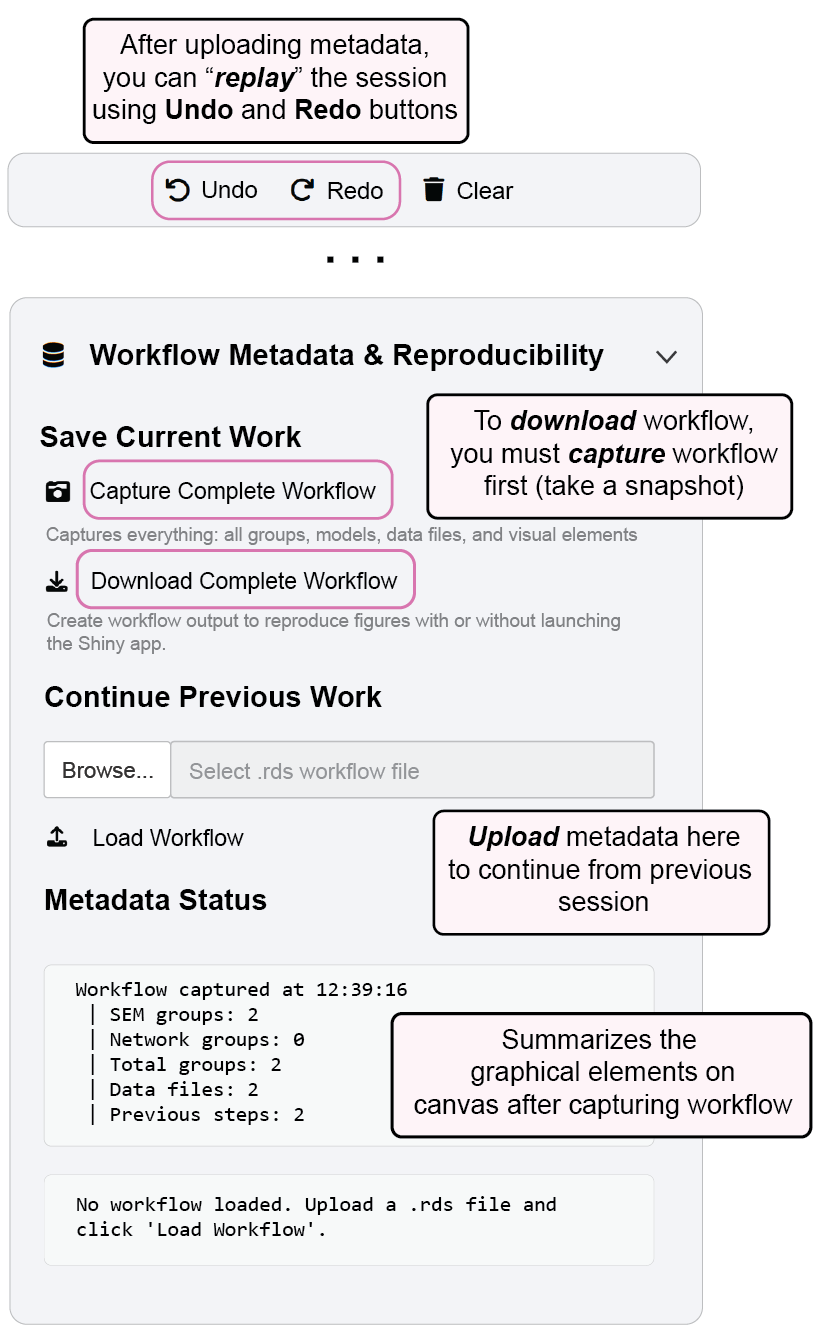
If you want to manually edit data frames containing information about graphics, you can use ggsem_silent() instead, which returns a list of output tables. ggsem_silent() re-runs the whole session’s metadata and reproduces the same diagram outputs. The output of ggsem_silent() can be converted into ggplot object using csv_to_ggplot().
library(ggsem)

metadata <- readRDS('ggsem_metadata.rds') # load metadata from the app
ggsem_data <- ggsem_silent(metadata) # edit ggsem_data
plot1 <- csv_to_ggplot(ggsem_data) # convert RDS into a list of data frames (output tables)

save_figure('plot1.png', plot1)
3. Load Metadata to Continue
If you load metadata onto the application, you will be able to trace back to previous clicks or progress further. Specify the filename for the metadata argument within ggsem().
ggsem(metadata = 'ggsem_metadata.rds')Save Current Work
Capture Complete Workflow:
Records all aspects of your current session including:
All group definitions and configurations
Statistical models and parameter estimates
Imported data files and datasets
Visual elements, layouts, and aesthetic settings
Current diagram state and positioning
Download Complete Workflow:
Exports workflow as a portable
.rdsfileEnables figure reproduction without relaunching the Shiny app
Preserves all analytical and visual components for future use
Supports collaborative sharing and publication reproducibility
Continue Previous Work
Upload Workflow to Continue:
Load previously saved
.rdsworkflow filesRestore complete analysis environment exactly as saved
Resume work from any previous session state
Maintain all model specifications, data, and visual customizations
Workflow can be replayed using Redo and Undo buttons
Metadata Status
Workflow Summary:
Displays current session metadata including:
Number of groups for SEM and networks
Session click counts and other information